Interoperability & Network
Overview
A comprehensive network strategy is essential before deploying Kadeck. This chapter outlines the interoperability considerations, network requirements, and connectivity patterns necessary for a successful single deployment of Kadeck.
While this guide focuses on a single deployment architecture, we strongly recommend a High Availability (HA) setup for production environments to ensure system resilience and continuous operation.
Network Strategy Planning
Before deployment, develop a detailed network strategy that addresses:
- Ingress configurations - How external clients will access the Kadeck
- Egress requirements - How Kadeck will connect to external systems
- Internal communication - Database connections and service dependencies
- Security boundaries - Network segmentation and access controls
- Authentication services - LDAP/OpenID connectivity
Connectivity Requirements
Ingress
Kadeck requires the following ingress configurations:
- HTTP(S) port accessibility for web browser connections
- WebSocket support for real-time updates and streaming data
- Proper proxy configurations if operating behind a load balancer or gateway
Egress
Kadeck establishes outbound connections to:
- PostgreSQL database for configuration storage
- Authentication providers (LDAP/OpenID)
- Integration endpoints (Kafka, Kinesis, Schema Registry, etc.)
Port Requirements
| Service | Default Port | Protocol | Notes |
|---|---|---|---|
| Kadeck Web Interface | 8080 | HTTP | Configurable |
| Kadeck Web Interface (TLS) | 8443 | HTTPS | With mounted certificate |
| PostgreSQL | 5432 | TCP | For configuration storage |
| LDAP | 389 | TCP | For authentication |
| LDAP (TLS) | 636 | TCP | Secure LDAP |
| OpenID Connect | 443 | HTTPS | For authentication |
| Kafka Brokers | 9092 | TCP | Plain connection |
| Kafka Brokers (TLS) | 9093 | TLS | Secure connection |
| Kafka Schema Registry | 8081 | HTTP | For schema management |
| Kafka Connect | 8083 | HTTP | For connector management |
| Amazon Kinesis | 443 | HTTPS | AWS service |
| JMX | 9010-9020 | Varies | Apache Kafka cluster metrics |
| ARGUS | 8080/8443 | HTTP(S) | Connection to one or multiple ARGUS instances |
Replace the default sample ports with your designated port numbers.
Configuration
Environment Variables
Kadeck can be configured through environment variables, including:
- Web server ports and binding addresses
- Database connection details (JDBC URL, credentials)
- Proxy settings if required
- Log levels and output paths
The exact environment variable names are documented in the installation guide.
Integration Configuration
Connections to external systems such as:
- Apache Kafka clusters (+ optional JMX)
- Amazon Kinesis
- Schema Registry
- Kafka Connect
- Microsoft Teams
- Slack
- PagerDuty
- Mail (SMTP)
These can be configured through Kadeck UI after deployment.
Deployment Considerations
Container Image
Kadeck is available as a Docker image containing all required dependencies including:
- Java Runtime Environment
- Web server components
- Required libraries
No additional runtime dependencies need to be installed on the host.
TLS/SSL Configuration
For secure deployments, SSL certificates must be:
- Generated or obtained from a trusted Certificate Authority
- Mounted to the container or pod
- Referenced in Kadeck configuration
The exact mounting path depends on the orchestration platform (Kubernetes, OpenShift, etc.).
Health Monitoring
For proper operation with container orchestrators, Kadeck exposes the following health endpoints:
/health- Overall health status/live- Liveness probe endpoint/ready- Readiness probe endpoint
Configure your orchestrator to use these endpoints for proper lifecycle management.
Network Topology
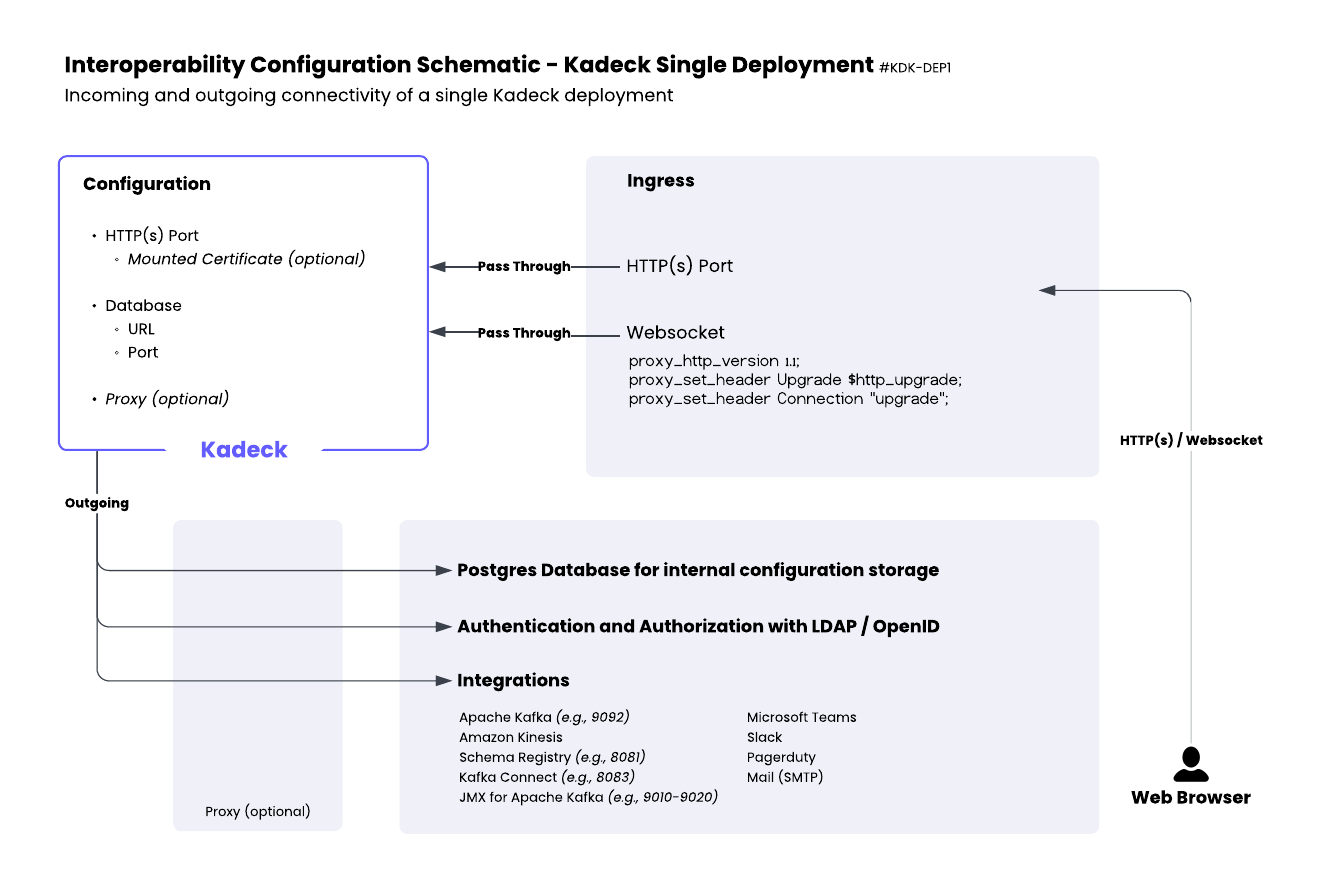
As illustrated in the attached diagram, Kadeck deployment consists of:
- Configuration Layer:
- HTTP(S) Port with optional mounted certificate
- Database connection (URL and Port)
- Optional proxy configuration
- Ingress Layer:
- HTTP(S) connections from web browsers
- WebSocket connections with appropriate proxy headers
- Outgoing Connections:
- PostgreSQL database for configuration storage
- Authentication services (LDAP/OpenID)
- Integration endpoints for various services
Security Recommendations
- Use TLS for all external connections
- Implement proper network segmentation
- Apply the principle of least privilege for all connections
- Configure proper authentication for all integration endpoints
- Regularly review and update network security policies
Example Deployment Architecture
A typical deployment would include:
- Ingress controller or load balancer handling external HTTP(S) traffic
- Kadeck container with mounted certificates
- Dedicated PostgreSQL instance for configuration storage
- Secure connections to authentication providers (optional)
- Properly configured firewall rules for integration endpoints
By carefully planning your network strategy before deployment, you can ensure proper operation and minimize security risks in your Kadeck implementation.