Architecture
This article explains where the JavaScript Processor sits in the data flow of a topic view, where it runs, and how it behaves in topic sets and Kadeck Pipes. Knowing the order of the steps helps to understand what a processor sees and what happens to the records it returns.
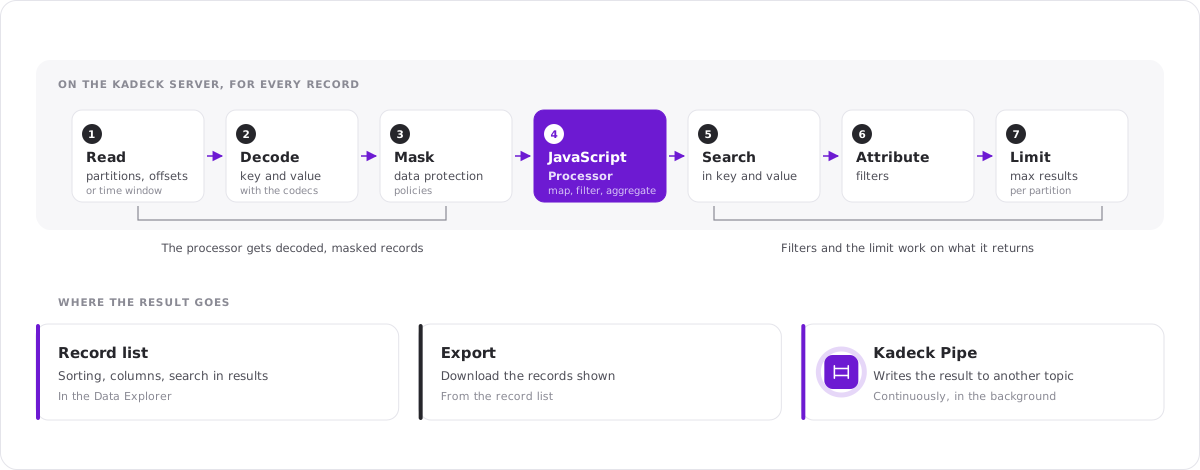
The data flow of a view
When you fetch records, Kadeck takes these steps for every record, in this order:
- Read the record from the partitions and the offsets or the time window of the view.
- Decode key and value with the codecs of the view.
- Mask the attributes that are covered by data protection policies.
- Run the JavaScript Processor.
- Apply the search in key and value.
- Apply the attribute filters.
- Count the record against the maximum number of results per partition.
Sorting, the choice of columns and the search in the displayed results happen afterwards, in the record list.
What follows from the order
The processor works with decoded records. It sees key and value as you see them in the record list, not as bytes. The codec of the view decides what rec.value looks like.
The processor sees masked data. Data protection is applied before the processor runs. A processor cannot be used to get around a policy.
Filters work on the result of the processor. The search and the attribute filters see the record as the processor returns it. You can add an attribute in the processor and filter by it. A record the processor leaves out never reaches the filters.
The limit counts the result. The maximum number of results per partition counts the records that are left after the processor and the filters. A processor or filter that leaves out most records therefore makes Kadeck read further into the topic to find enough results. The status bar below the record list shows how many records were scanned and how many are shown.
The output is not always a record. A processor can return the record, a changed record, or nothing. With a state, the value it returns may describe many records, for example a running total.
Where the processor runs
The processor runs on the Kadeck server, not in your browser. Kadeck starts a JavaScript runtime for the view, runs your code for every record, and sends only the results to the record list.
- Every fetch gets a fresh runtime. Nothing is carried over from one fetch to the next, including the state.
- While past records are fetched, the partitions are read side by side, each with a runtime and a state of its own. The order in which records of different partitions are processed is not defined.
- In Live mode, all partitions share one runtime and one state.
- The processor is called for every record that is read. Code that does a lot of work per record slows the fetch down.
In a topic set
In a topic set, every view has its own processor. It runs for the records of its view only.
All combined can have a processor as well. It runs for the records of every view, after the processor and the filters of the view the record comes from. This way you can prepare the records of each topic in its view and apply common logic to all of them in the combined view.
In a Kadeck Pipe
A Kadeck Pipe takes the same steps as the view it was created from and then writes the result to a topic. For the processor this means:
- The key, the value and the headers the processor returns are what the pipe writes. A record the processor leaves out is not written.
- A pipe has one state for all partitions. It starts empty when the pipe is started or resumed.
- A processor may work on a single record for up to 5 seconds. If it takes longer, it is interrupted and the record is treated as failed.
- A record the processor fails on does not stop the pipe. It is dropped or written to the dead letter topic, as configured for the pipe.
See Configuration, guarantees and permissions for the details.