Configuration, guarantees and permissions
This article describes the settings of a Kadeck Pipe, what a pipe guarantees about the records it writes, and which rights are needed to work with pipes.
How a pipe processes a record
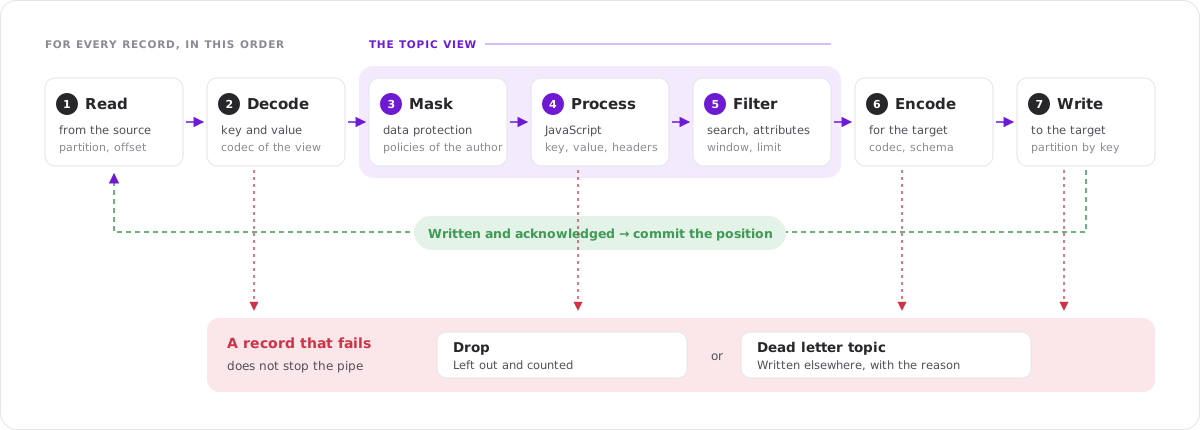
A pipe runs inside Kadeck. For every record of the source topic it takes the same steps the Data Explorer takes to show the record, and then writes the result:
- Read the record from the source topic.
- Decode key and value with the codecs of the view.
- Mask the attributes that are covered by data protection policies.
- Process the record with the JavaScript Processor of the view, which can change its key, value and headers or drop it.
- Filter by the searches, attribute filters and the end condition of the view.
- Encode key and value with the codecs chosen for the target.
- Write the record to the target topic.
The position of the pipe is committed only after the records up to it are written and acknowledged by the target cluster.
Settings
All settings are made in the Convert to Kadeck Pipe dialog. A pipe cannot be changed afterwards: to change a setting, stop the pipe and duplicate it.
Target
| Setting | Description |
|---|---|
| Cluster | The connection the pipe writes to. It is the cluster of the source topic unless you choose another one. |
| Topic | The topic the pipe writes to. It must exist, and it cannot be the topic the pipe reads from. |
Pipe
| Setting | Description |
|---|---|
| Name | The name of the pipe. It is shown in lists, in the flow and in the lineage header. |
| Owner | Who is responsible for the pipe: a person or a team. Free text. |
| Description | What the pipe is for. |
The user who creates the pipe is its author. The author cannot be changed and decides which data protection policies apply.
Apply
Entire view applies everything the view does. Selected parts lets you choose:
| Part | What the pipe takes from the view | Without it |
|---|---|---|
| JavaScript processor | The processor of the view. | Records are written as they are read. |
| Filters | Searches in key and value and attribute filters that are switched on. | No record is filtered out. |
| Offsets and partitions | The partitions the view reads and the offsets it starts at. | All partitions are read. |
| End condition | The maximum number of results per partition, the time window or the time range. | The pipe reads to the end of the topic. |
Important: A view always has a maximum number of results per partition, 50 by default. With Entire view, or with End condition selected, a pipe writes at most that many records per partition, counted after the filters. Switch End condition off to process a whole topic.
If the selected parts do not say where the pipe starts, Start at appears:
- Earliest: from the beginning of the topic.
- Latest: only records that arrive from now on. Available for pipes that keep running.
Run
| Mode | Starts at | Ends |
|---|---|---|
| Run once | Where the applied parts of the view start. | At the end condition, or at the end of the topic as it was when the pipe started. |
| Keep running | Where the applied parts of the view start. | When a user stops it. The end condition only decides where the pipe starts. |
A time window that is relative to now, such as the last hour, is fixed at the moment the pipe starts.
Write as
| Setting | Description |
|---|---|
| Key codec, Value codec | The codecs the records are written with. They are filled in with the codecs of the view, as far as these can write. None writes no key. |
| Schema id | For codecs with schemas: the id of the schema to write with. With -1, the codec chooses, as it does when you produce a record in the Explorer. |
| Message type | For Protobuf: the fully qualified name of the message type. |
| Schema context | The context of the Schema Registry to use. |
Schemas are looked up in the Schema Registry of the target cluster. Source and target can use different registries.
A key or value that the view did not change is written byte for byte as it was read, as long as source and target are on the same cluster, the codec stays the same and no schema is named. Everything else, including every key or value the JavaScript Processor changed, is encoded with the codecs chosen here.
On error
A record can fail because it cannot be decoded, because the processor throws an error or does not finish, because the result does not fit the codec or schema of the target, or because the target cluster rejects it, for example as too large. Such a record does not stop the pipe:
- Drop leaves the record out and counts it as Dropped.
- Dead letter topic writes the record, as it was read, to a topic of your choice and counts it as Dead-lettered. The topic can be on any cluster. A record the target cluster rejected is written the way the pipe tried to write it.
A record in the dead letter topic carries these headers:
| Header | Content |
|---|---|
kadeck.pipe | The name of the pipe |
kadeck.pipe.error.stage | Where it failed: DECODE, PROCESS, ENCODE or PRODUCE |
kadeck.pipe.error.message | What went wrong |
kadeck.pipe.source.topic | The topic the record was read from |
kadeck.pipe.source.partition | Its partition |
kadeck.pipe.source.offset | Its offset |
The last record that failed is shown in the details of the pipe.
The JavaScript Processor of a pipe may work on a single record for up to 5 seconds. A processor that takes longer is interrupted, and the record is treated as failed.
Governance
| Setting | Description |
|---|---|
| Data masking | Applies the data protection policies of the author to the records before they are processed and written. See Data protection. |
| Lineage header | Adds the header kadeck.pipe with the name of the pipe to every record, so that consumers can tell where a record came from. |
Alerts
A pipe can notify one or more alert integrations:
- when the pipe fails,
- when the pipe is paused,
- when its lag exceeds a number of records.
The cooldown sets how long Kadeck waits before it sends the lag alert again.
Guarantees
Delivery
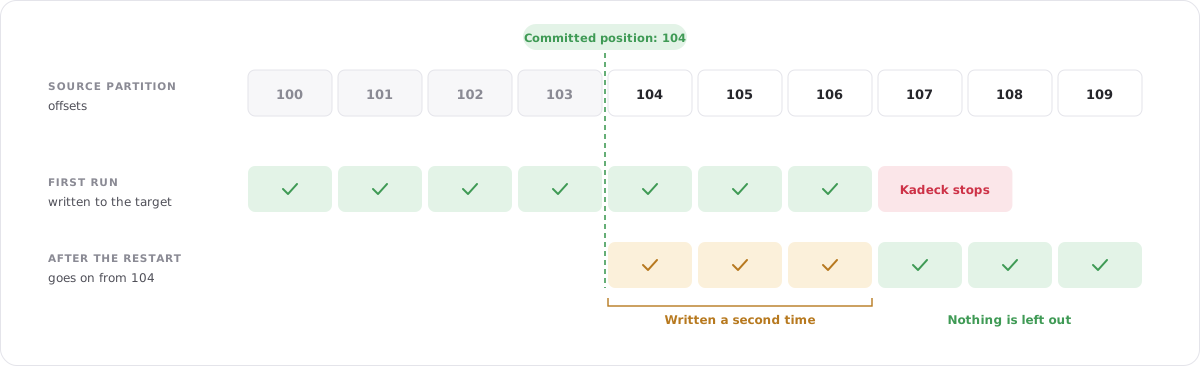
A pipe delivers at least once. It commits its position only after the records up to that position are written, about once per second. When a pipe is paused, fails, or Kadeck is restarted, it goes on from the last committed position:
- No record is left out.
- Records can be written twice: the records between the last commit and an unexpected stop are written again. A pipe that is paused or stopped by a user commits first and does not repeat records.
If consumers of the target topic cannot handle duplicates, make the records identifiable, for example by a key or by an id in the value.
Order
Records of one source partition are processed in their order. They are distributed over the partitions of the target topic by the key they are written with, so records with the same key keep their order. A key the JavaScript Processor changes therefore also changes the partition a record goes to. The target topic may have a different number of partitions than the source. Records without a key are distributed evenly.
What is kept
| Part of the record | Written to the target |
|---|---|
| Key | As the view shows it. A key the JavaScript Processor sets is the key of the written record; null writes the record without a key. |
| Value | As the view shows it, with the changes of the JavaScript Processor. |
| Headers | All headers, including repeated ones, unless the processor or data masking changes them. |
| Timestamp | The timestamp of the source record. |
| Partition | Chosen by the key that is written. The partition of the source record is not kept. |
Changing the key
The record a JavaScript Processor returns is the record the pipe writes, including its key:
rec.key = "New Key";
return rec;
- The new key is encoded with the key codec of the pipe and decides the partition in the target topic.
- A key the processor does not touch is written as it was read.
rec.key = nullwrites the record without a key.
A key or value that was not changed is written byte for byte as it was read where source and target are on the same cluster and use the same codec. This only concerns unchanged keys and values: a changed one is always encoded anew.
Restarts and failures
- Kadeck resumes all running pipes after a restart. No action is needed.
- In a deployment with several Kadeck nodes, every pipe runs on exactly one node. If that node is no longer available, another node takes the pipe over after about 30 seconds.
- A pipe that cannot go on, for example because a cluster is not reachable or a topic was deleted, changes to Failed and shows the reason. Fix the cause and Resume the pipe.
Position
A pipe commits its position to the consumer group kadeck-pipe-<id> on the source cluster. The group is listed under Consumers and is deleted together with the pipe.
Important: The user Kadeck connects with needs the right to commit offsets for consumer groups with the prefix kadeck-pipe- on the source cluster, and the right to write to the target topic on the target cluster. Without them the pipe fails when it starts.
Data protection
Data protection policies decide which attributes a user sees masked. A pipe must not become a way around them: it applies the policies of its author and writes the masked values.
- By default, the system setting Always apply the author's data masking and protection policies to pipes under Administration → Settings is switched on. The Data masking setting of a pipe is then always on.
- If an administrator switches the setting off, the author decides per pipe.
- The policies are evaluated while the pipe runs. A change to a policy, or to the groups of the author, takes effect within a minute.
- A policy that prohibits a codec for a topic also prohibits it for a pipe: the pipe fails with the reason.
- When masking applies, records in the dead letter topic are masked as well. A record that could not be decoded, and therefore not masked, is written there without its key and value.
- Every pipe that reads a topic covered by a policy is recorded in the audit log.
Important: A pipe keeps running when its author later loses access to the source or target topic, or is removed. Review the pipes of a user when you change their rights, and stop the pipes that should no longer run.
Permissions
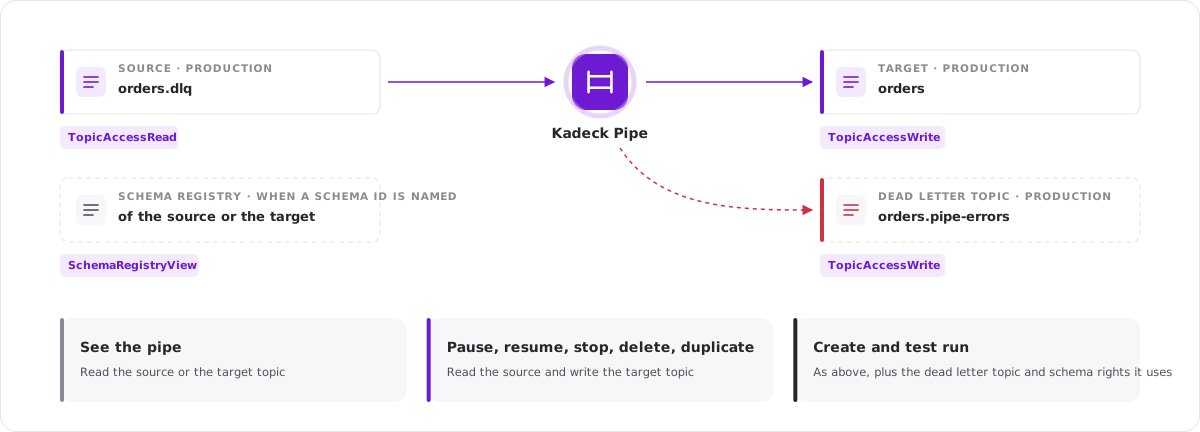
Pipes use the existing topic rights. There is no separate right for pipes.
| Action | Required rights |
|---|---|
| See a pipe and its figures | TopicAccessRead for the source topic, or TopicAccessRead or TopicAccessWrite for the target topic |
| Pause, resume, stop, delete, duplicate | TopicAccessRead for the source topic and TopicAccessWrite for the target topic |
| Create a pipe, test run | As above, plus TopicAccessWrite for the dead letter topic if one is used |
| Name a schema id | SchemaRegistryView for the cluster whose Schema Registry holds the schema |
Rights are checked when a user creates or manages a pipe. The pipe itself runs with the connection of the cluster, not with the rights of a user.
A user who can see a pipe can open its details, including the JavaScript Processor and the filters of its view. The records of a topic are only shown to users with TopicAccessRead for that topic.
Limits
- One active pipe at a time in Kadeck Platform Free. Stopped and completed pipes do not count.
- A pipe reads one topic and writes to one topic.
- Apache Kafka only.