Writing processors
This article describes what the code of a JavaScript Processor can use: the record, the values it can return, the state it can keep, and helpers for headers. It closes with examples you can copy.
The record
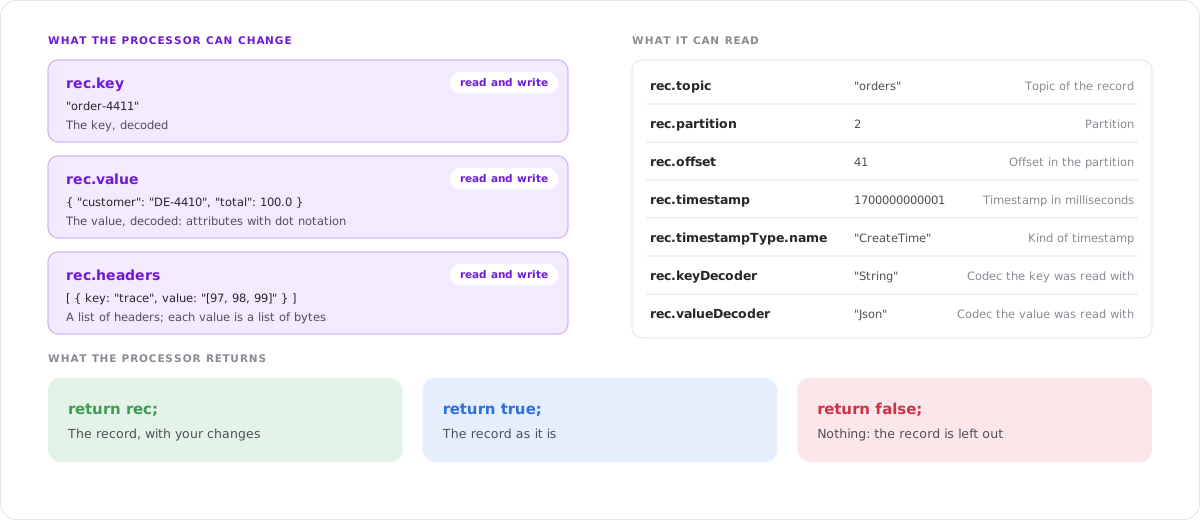
The record is available as rec.
| Attribute | Description | Can be changed |
|---|---|---|
rec.key | The key, decoded with the codec of the view | Yes |
rec.value | The value, decoded with the codec of the view | Yes |
rec.headers | The headers as a list of { key, value }. See Headers. | Yes |
rec.topic | The topic of the record | No |
rec.partition | The partition | No |
rec.offset | The offset in the partition | No |
rec.timestamp | The timestamp in milliseconds since 1970 | No |
rec.timestampType.name | The kind of timestamp, for example CreateTime | No |
rec.keyDecoder | The codec the key was read with, for example String | No |
rec.valueDecoder | The codec the value was read with, for example Json or Avro | No |
Changes to attributes that cannot be changed are ignored.
With structured codecs such as JSON, Avro or Protobuf, rec.value is an object. Use the dot notation to reach its attributes, for example rec.value.customer.address.city. With the String codec, rec.value is a text.
Tip: To find the path of an attribute, select a record in the record list and look at its value in the detail view. The attribute names you see there are the names to use after rec.value..
Attributes that are covered by a data protection policy arrive masked. A processor cannot read the original value.
Return values
Your code must end with a return.
| Return | Result |
|---|---|
return rec; | The record is shown with the key, value and headers it has now. |
return true; | The record is shown as it is. Changes you made to rec are not applied. |
return false; | The record is left out. |
Any other return value, or no return at all, is an error.
A condition is a short way to write a filter:
return rec.value.total > 1000;
Make sure a filter returns true or false and not the value of an attribute, which may be missing. return !!rec.value.express; turns any value into true or false.
Changing key and value
Change rec and return it:
// change an attribute
rec.value.status = rec.value.status.toUpperCase();

// add an attribute
rec.value.gross = rec.value.total * 1.19;

// remove an attribute
delete rec.value.internalNote;

// set a new key
rec.key = rec.value.customerId;

return rec;
You can also replace the whole value:
rec.value = {
  id: rec.value.id,
  name: rec.value.firstName + " " + rec.value.lastName
};
return rec;
State
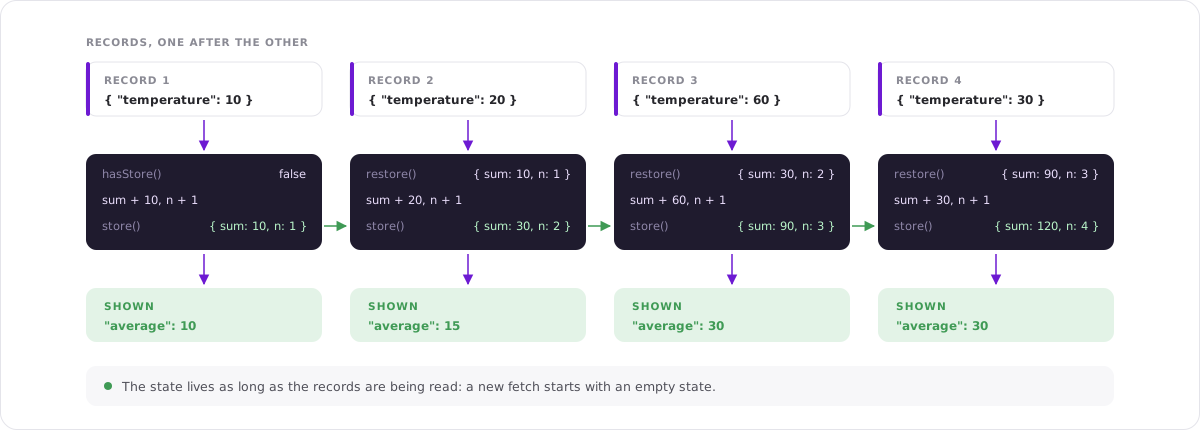
The processor is called once per record and forgets its variables between two records. To carry something over, put it into the state:
| Function | Description |
|---|---|
store(data) | Saves data as the state. It replaces what was stored. |
restore() | Returns what was stored. |
hasStore() | true if something was stored already. |
The state can be a number, a text, a list or an object.
// number the records
var count = hasStore() ? restore() : 0;
count = count + 1;
store(count);

rec.value.count = count;
return rec;
What you need to know about the state:
- It starts empty every time the records are read: with every Fetch, when Live is started, and when a pipe is started or resumed.
- It is kept per partition while past records are fetched. Kadeck reads the partitions side by side, each with a state of its own. A counter therefore counts per partition. In Live mode and in a Kadeck Pipe, there is one state for all partitions.
- Keep it small. An object that grows with every record uses more and more memory. Remove what you no longer need.
- Use the state, not global variables. Variables you declare outside of your code do not exist.
Headers
rec.headers is a list of headers. Each header has a key and a value; the value is the list of the bytes of the header, written as text, for example "[97, 98, 99]".
| Function | Description |
|---|---|
headerToString(value) | Turns the value of a header into text. |
headerFromString(text) | Turns text into the value of a header. |
Read a header
var trace = rec.headers.find(h => h.key === "trace");
rec.value.trace = trace ? headerToString(trace.value) : null;
return rec;
Read a number from a header
Numbers are stored as bytes. Read them with a buffer:
var header = rec.headers.find(h => h.key === "retries");
var bytes = Buffer.from(JSON.parse(header.value));

rec.value.retries = bytes.readInt32BE(0);   // 4 bytes
// Number(bytes.readBigInt64BE(0))  for 8 bytes (long)
// bytes.readFloatBE(0), bytes.readDoubleBE(0)  for float and double

return rec;
Filter by a header
var source = rec.headers.find(h => h.key === "source");
return !!source && headerToString(source.value) === "crm";
Add or remove a header
rec.headers.push({ key: "checked-by", value: headerFromString("kadeck") });
rec.headers = rec.headers.filter(h => h.key !== "debug");
return rec;
A record keeps at least one header: removing all headers of a record has no effect.
What else is available
- Processors are written in modern JavaScript:
letandconst, arrow functions, template strings,JSON,Math,Dateand regular expressions work as usual. btoa(text)andatob(text)encode and decode Base64.console.log()writes to the log of the Kadeck server, not to your browser.
Errors
When the code fails, the error is shown below the editor.
| Error | Cause |
|---|---|
SyntaxError: … | The code is not valid JavaScript. |
TypeError: Cannot read properties of undefined (reading '…') | A record does not have the attribute you read from. Check it first: if (rec.value.customer) … or rec.value.customer?.name. |
ReferenceError: … is not defined | A variable is used that was never declared, for example one from an earlier record. Use the state. |
Unexpected error: … | The code returned something other than rec, true or false, or nothing at all. |
Records are not all alike. Code that works for the first record can fail for a later one with a missing attribute, a null value or a different structure, so check before you read.
Examples
Filter by a date
Show the orders that are delivered at a weekend:
var day = new Date(rec.value.deliveryDate).getDay();
return day === 0 || day === 6;
Compare two attributes
return rec.value.shippedQuantity < rec.value.orderedQuantity;
Flatten a nested value
var v = rec.value;
rec.value = {
  orderId: v.id,
  customer: v.customer.name,
  city: v.customer.address.city,
  items: v.items.length
};
return rec;
Moving average
var s = hasStore() ? restore() : { sum: 0, n: 0 };
s.sum += rec.value.temperature;
s.n += 1;
store(s);

rec.value.average = s.sum / s.n;
return rec;
Show every key once
var seen = hasStore() ? restore() : {};
if (seen[rec.key]) return false;

seen[rec.key] = true;
store(seen);
return true;
Show a timestamp as a date
rec.value.producedAt = new Date(rec.timestamp).toISOString();
return rec;