Kadeck Pipes in Kadeck Desktop
Kadeck Desktop turns a topic view into a Kadeck Pipe as well. A pipe either runs once on your computer, or you push it to your team's Kadeck Platform, where it can keep running without Kadeck Desktop.
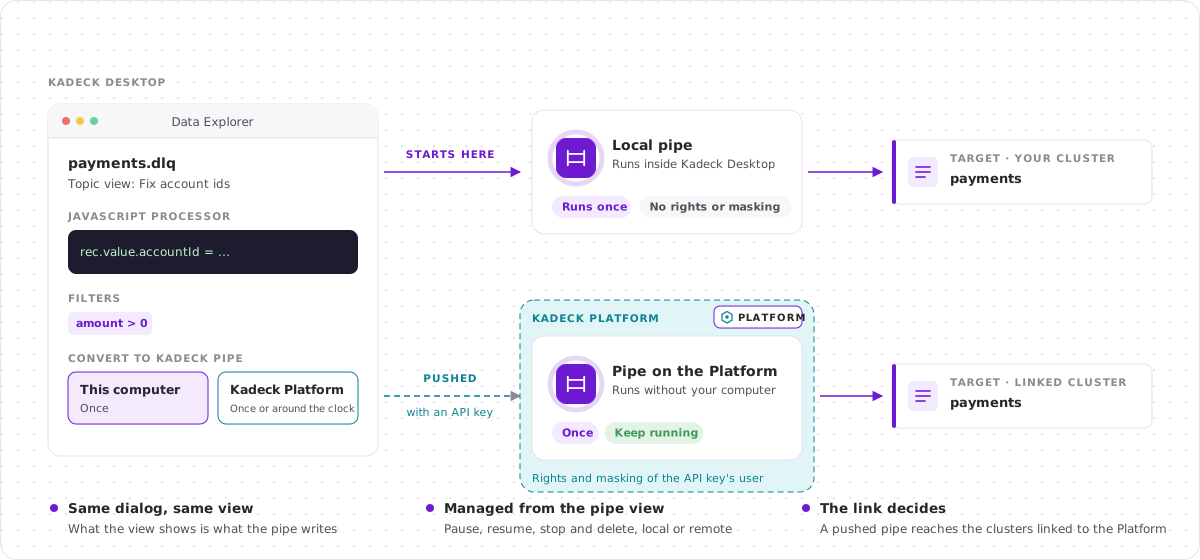
On this computer or on Kadeck Platform
| This computer | Kadeck Platform | |
|---|---|---|
| Runs in | Kadeck Desktop, while it is open | Kadeck Platform, without your computer |
| Modes | Run once | Run once or keep running |
| Rights | None: it is your connection | The rights of the user the API key belongs to |
| Data masking | Not applied | Always applied, with the policies of the API key's user |
| Target | Any Apache Kafka connection of Kadeck Desktop | Clusters that are linked to the same Kadeck Platform |
| Needs | Nothing else | A link to Kadeck Platform |
Both kinds of pipes offer the test run, the choice between the entire view and selected parts, a dead letter topic and the lineage header. Alerts are set up on Kadeck Platform and are not part of Kadeck Desktop.
Run a pipe on your computer
- Open the Explorer, select a topic or view and set it up until the record list shows what you want to write.
- Click Pipe in the toolbar of the view, next to Produce. The Convert to Kadeck Pipe dialog opens with This computer selected.
- Enter a Name, choose the Target cluster and topic, and check the codecs under Write as.
- Open Options if you want to apply only parts of the view, write failed records to a dead letter topic or add the lineage header.
- Click Test run to check the pipe with one record, then Start pipe.
Kadeck Desktop opens the pipe view. The pipe writes what the view shows and completes.
Good to know:
- A local pipe needs Kadeck Desktop to be open. If you close Kadeck Desktop while a pipe is running, the pipe is shown as Interrupted the next time you start it. Click Resume and it goes on where it stopped.
- The pipe keeps its position in a consumer group named
kadeck-pipe-<id>on the source cluster. Deleting the pipe removes the group.
Link a connection to Kadeck Platform
To push pipes, Kadeck Desktop needs to know which connection on Kadeck Platform is the same cluster as your connection. We call this a Platform link.
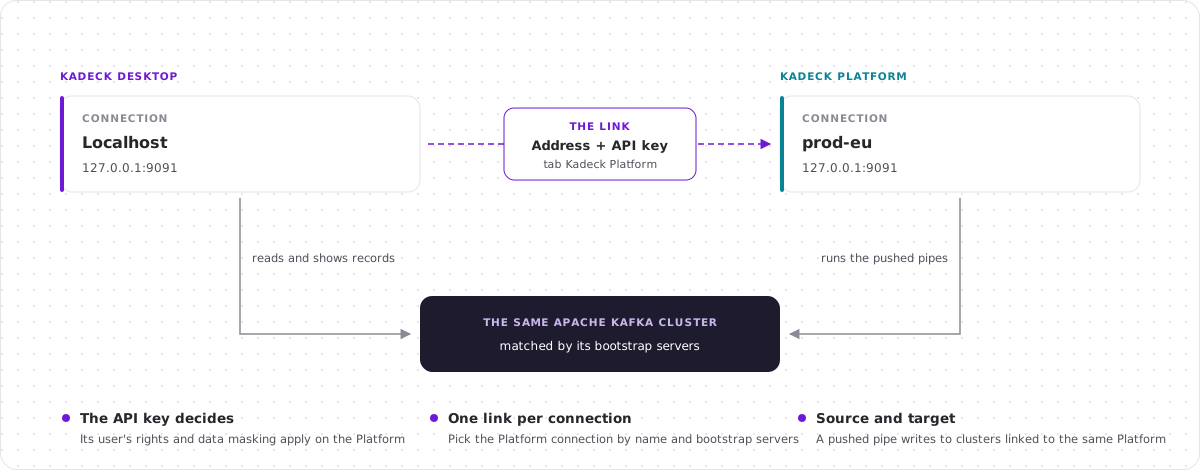
You need:
- Kadeck Platform 7.1 or later with a paid license.
- An API key. Ask your administrator for a Public API user, or use your own: see Access and authentication. The key's user needs to see the connection and needs
TopicAccessReadfor the topics you read andTopicAccessWritefor the topics you write to.
Set up the link:
- On the Connections page, open the menu of a connection and choose Configuration.
- Select the Kadeck Platform tab.
- Enter the Address of your Kadeck Platform and the API key, then click Connect.
- Choose the Cluster on Kadeck Platform. The list shows every connection the key may see, with its name and bootstrap servers. A connection with the same bootstrap servers as yours is automatically selected for you.
- Click Update.
Once saved, the tab shows the status Linked. To remove the link, click Remove link and save the connection.
Good to know:
- Switch on Allow untrusted certificate only if your Kadeck Platform uses a certificate your computer does not trust, for example a self-signed one.
- The API key is stored on your computer with the settings of the connection. Kadeck Desktop does not show it again; to replace it, enter a new one.
- A pipe on Kadeck Platform can only write to clusters that are linked to the same Kadeck Platform. Link the connection of the target cluster as well if it is a different one.
Push a pipe to Kadeck Platform
- Open the Convert to Kadeck Pipe dialog as described above.
- Under Run, select Kadeck Platform.
- Choose Run once or Keep running.
- Enter the name and the target. Only connections that are linked to the same Kadeck Platform are offered.
- Click Test run, then Push to Platform.
The test run and the pipe are executed by Kadeck Platform, with the rights of the API key's user. If the connection is not linked yet, Push to Platform stays disabled.
Important: A pushed pipe always applies the data masking policies of the API key's user.
The pipe view
Every pipe opens as a pipe view: the records of the source topic the way the pipe processes them, with the pipe itself at the top.
- State and mode: Running, Paused, Interrupted, Failed, Completed or Stopped, and whether the pipe runs once or keeps running. A pipe on Kadeck Platform carries the Platform tag.
- Source and target: the topics with their clusters. Click the target topic to open its records.
- Figures: records Read, Written, Filtered and Skipped or Dead-lettered, the Speed while the pipe runs, and the Lag of a pipe that keeps running.
- Actions: Pause, Resume, Stop and Delete.
While a pipe is running, paused or failed, its view is read-only. Once it has ended, you can change the view, start a new pipe from it with Pipe, or keep it with Save as view.
Note: The pipe view of a pipe on Kadeck Platform reads the source topic through your connection in Kadeck Desktop. Data masking applies to what the pipe writes, not to what Kadeck Desktop shows you.
Find your pipes
The Pipes folder in the Explorer lists the pipes of the selected connection:
- the pipes that ran or run on this computer,
- for a linked connection, the pipes on Kadeck Platform that read from or write to the same cluster, marked with the Platform tag.
A dot shows the state of each pipe. A pipe on Kadeck Platform whose source cluster is not linked in Kadeck Desktop is listed, but cannot be opened.
Typical error cases
What a pushed pipe may do is decided by Kadeck Platform. Kadeck Desktop shows what the Platform answers:
| Message | What it means |
|---|---|
| Kadeck Platform did not accept the API key. | The key is wrong, was removed, or its user has no seat. Check the key in the Kadeck Platform tab. |
| The API key is not allowed to do this on Kadeck Platform. | The key's user lacks a right, for example TopicAccessWrite for the target topic. |
| View only: your API key may not manage this pipe. | You can look at the pipe, but not pause, resume, stop or delete it. |
| Kadeck Platform cannot be reached at … | The address is wrong, or Kadeck Platform is not reachable from your computer. |
| The certificate of Kadeck Platform … is not trusted. | Switch on Allow untrusted certificate for the link if you trust the server. |
| No Kadeck Platform 7.1 or later answers at this address. | The server is an older Kadeck Platform, or not a Kadeck Platform. |
| The connection … is not linked to this Kadeck Platform. | The target or dead letter cluster has no link, or is linked to another Kadeck Platform. |
Differences from Kadeck Platform
Some parts of Kadeck Pipes are only available on Kadeck Platform:
- the Pipes page with all pipes (including other users) of all clusters,
- the Pipes tab of a topic in the Catalog,
- alerts, the audit log and owners,
- Duplicate: in Kadeck Desktop, open the pipe view of an ended pipe and click Pipe to start a new one from it.
What a pipe writes, what it guarantees and how its settings work is the same everywhere: see Configuration, guarantees and permissions.