Permissions
Two rights decide who can write and change JavaScript Processors, and for which topics.
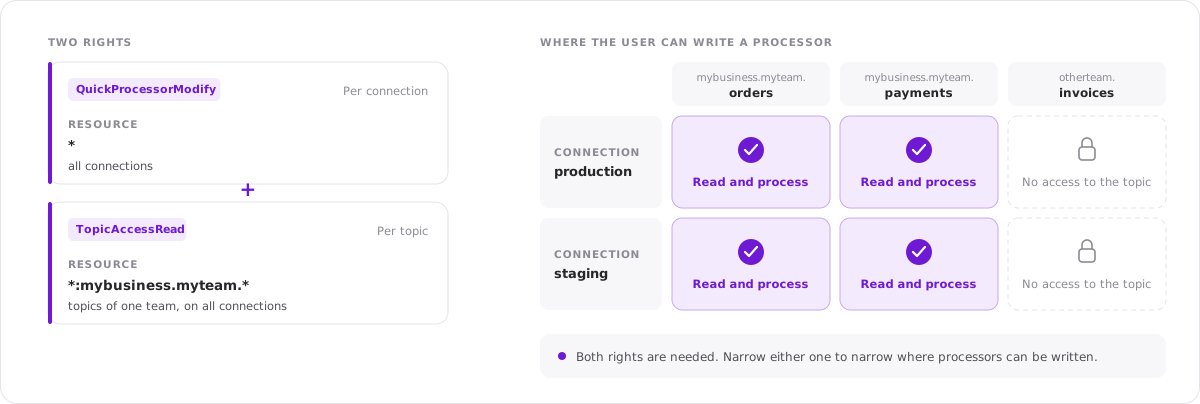
Required rights
To create or change a processor, a user needs both:
| Right | Assigned for | Purpose |
|---|---|---|
QuickProcessorModify | A connection, or all | Write and change the code of processors |
TopicAccessRead | Topics | Read the records of the topic the processor is for |
QuickProcessorModify is assigned per connection. TopicAccessRead can be assigned down to single topics, with wildcards for groups of topics. Combined, the two rights let you decide for which topics, namespaces and environments a user can write processors.
The name of the right goes back to the former name of the feature, Quick Processor.
Example
A team should be able to use processors on its own topics, in every environment:
| Action | Resource | Effect |
|---|---|---|
QuickProcessorModify | * | Allow |
TopicAccessRead | *:mybusiness.myteam.* | Allow |
With this role, a user can write processors on all connections, but only for topics whose name begins with mybusiness.myteam.. Other topics cannot be read, so there is nothing to process.
To limit processors to one environment, assign QuickProcessorModify for the id of that connection instead of *.
Rights are assigned to roles under Administration → Roles.
Using a view with a processor
The right QuickProcessorModify is about writing code. A saved view that has a processor can be opened by everyone who can read its topic: the processor runs, and the user sees the records as it returns them. Without the right, the code is shown, but changes to it cannot be applied and the processor cannot be removed from the view.
Processors and data protection
Data protection policies are applied before the processor runs. The processor of a user receives the records the way the user is allowed to see them, with masked attributes masked. See Architecture.
Who should get the right
A processor is code that runs on the Kadeck server. Assign QuickProcessorModify to the users who need it and whom you trust to write code that runs there, and prefer assigning it for specific connections, for example development and test environments, over assigning it for all.
Kadeck Pipes
Turning a view with a processor into a Kadeck Pipe needs the rights for pipes: TopicAccessRead for the source topic and TopicAccessWrite for the target topic. See Configuration, guarantees and permissions.