Use cases
This article walks through three typical uses of Kadeck Pipes. Each of them would otherwise need a small application of its own, with a repository, a build pipeline and somebody who operates it. With a pipe, it is a matter of minutes.
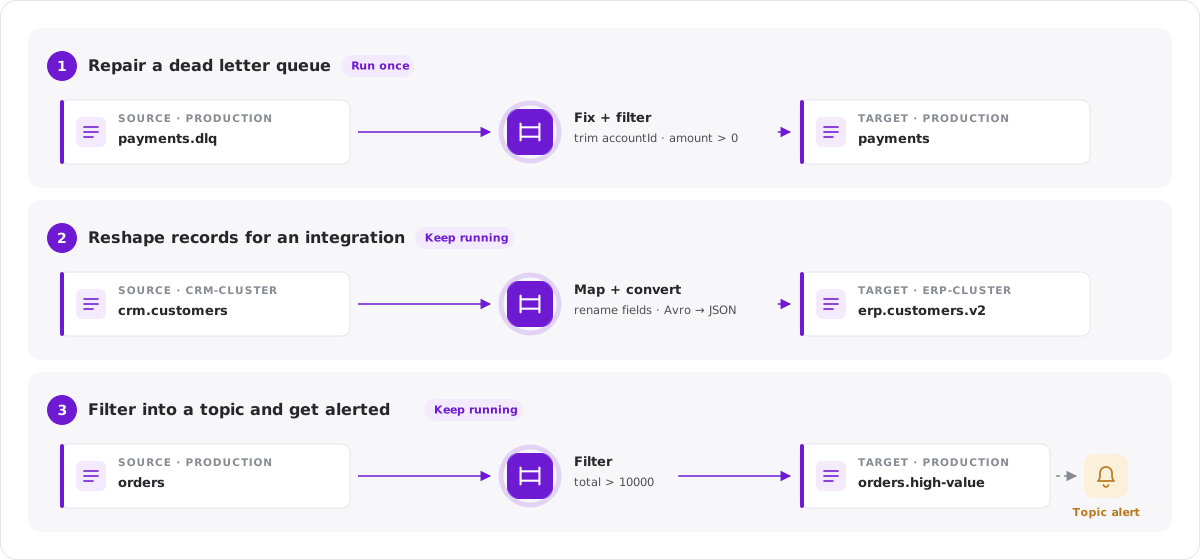
Repair a dead letter queue
An application rejected a number of records because of a malformed attribute, and they ended up in its dead letter queue. You want to correct the records and hand them back to the application.
-
Open the dead letter topic in the Explorer.
-
Open the JavaScript Processor and correct the records:
rec.value.accountId = rec.value.accountId.trim().toUpperCase();
return rec; -
Add filters if only a part of the records should be written back, for example the records of one error type.
-
Check the record list: it shows the records the way they will be written.
-
Click Pipe in the toolbar and choose the original topic as the target.
-
Under Apply, choose Selected parts and switch End condition off, so that the pipe processes all records of the topic and not only the number of results the view shows.
-
Choose Run once, click Test run, then Start pipe.
The pipe completes when it reaches the end of the dead letter topic. Records that arrive in the dead letter topic later are not processed; to handle them as well, choose Keep running.
Tips
- Switch Lineage header on. Every corrected record then carries the header
kadeck.pipewith the name of the pipe, so it stays visible where the record came from. - To correct only a known range of records, set the offset and the maximum number of results in the display settings of the view and apply the Entire view.
Reshape records for an integration
A system expects customer records in its own structure and codec, on its own cluster. The records exist, in a different shape, in a topic of another team.
-
Open the topic in the Explorer.
-
Use the JavaScript Processor to build the structure the target expects:
rec.value = {
  customerId: rec.value.id,
  name: rec.value.firstName + ' ' + rec.value.lastName,
  country: rec.value.address.countryCode
};
return rec; -
Click Pipe in the toolbar.
-
Choose the target cluster and topic.
-
Under Write as, choose the codec the target expects, for example Json while the source topic is read with Avro. For codecs with schemas you can name the schema to write with.
-
Under Apply, choose Selected parts and switch End condition off.
-
Choose Keep running and start the pipe.
From now on, every record that arrives in the source topic is written to the target in the new shape. The Pipes tab of both topics in the Catalog shows the connection between them.
Tips
- Give the records the key the target expects:
rec.key = rec.value.customerId;. The pipe writes the key the processor returns, and the new key decides the partition. - Write records that cannot be processed to a Dead letter topic instead of dropping them. Each of them carries the reason in its headers.
- Add an alert for the case that the pipe fails or falls behind.
Filter into a topic and get alerted
You want to know when an order above a certain value arrives, without building a consumer for it.
- Open the topic in the Explorer and add an attribute filter, for example
total > 10000. - Click Pipe in the toolbar and choose a target topic, for example
orders.high-value. - Under Apply, choose Selected parts and switch End condition off.
- Choose Keep running and, as the start position, Latest, so that only orders that arrive from now on are written.
- Start the pipe.
- Open the target topic in the Catalog and add a topic alert that notifies you when records arrive.
The target topic now contains exactly the records you care about. It can be read by a dashboard, a notification service, or a colleague in the Explorer.
More ideas
- Sample a topic: write a filtered part of a production topic to a topic of a test cluster.
- Mask data for another team: let a user whose data protection policies mask sensitive attributes create the pipe. The target topic contains the masked records.
- Move a time window: select a time range in the view and run the pipe once to copy the records of an incident to a topic of their own.